
Associating Files with 3D Objects
You can associate external files with loaded 3D objects via the Associated Files screen.
For example, you could associate summary information relating to survey station points, or add rimpull analysis data to a haultruck simulation object.
External files are displayed using the current default application for the associated file type. You display a file by right-clicking the associated object overlay in any 3D window. For example, in the image below, two macro files are associated with a string. Right-clicking the string in a 3D view reveals the following options:
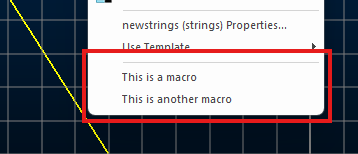
Clicking either opens the macro in a text editor (as that is the default viewer on the system for .mac files).
Note: the Description of an associated file is displayed in the menu. See below.
What Files can be Linked?
The list below is not intended to be a definitive list of document types that can be linked to objects; it is an indication of the range of documents that are available - there are in fact very few documents which cannot be linked to 3D objects.
Microsoft
-
Microsoft Office (any type)
-
Other Microsoft Office document types
-
Microsoft Works documents
-
Microsoft Windows script (SCT, WSF)
-
Automation script (JS, VBS)
Datamine Products
-
InTouch (EVR)
-
Downhole Explorer (DHX)
-
Terrain (ETN)
-
ViewPoint (EVP)
-
OreFinder (EOF)
-
MaxiPit (ENS, GPH, MDL, GRD, SRF)
-
NPV Scheduler (ENS, GPH, MDL, GRD, SRF)
-
DHLogger
-
Borehole Manager
-
MineMapper
Studio Products
-
Datamine Studio 2 project (DMD) *
-
Datamine Studio 3 project (.dmproj) *
-
Datamine Studio RM project (.rmproj)
-
Datamine Studio EM project (.emproj)
-
Datamine Studio OP project (.opproj)
-
Datamine Studio Mapper project (.mapproj)
-
Datamine Studio NPVS project (.npvs)
-
Datamine Studio NPVS+ project (.snpvs)
-
Datamine Studio Geo project (.geoproj)
-
Datamine Studio UG project (.ugproj)
-
Datamine Strat3D project (.s3dproj)
-
Datamine Visualizer replay (GVP) *
Database
-
Microsoft Access (MDB, ADP)
-
Text (TXT, CSV, RTF
-
WinZip archive (ARC, ZIP)
CAD
-
AutoCad (DWG, DXF)
Publishing
-
Crystal Reports (RPT)
-
Adobe Acrobat (PDF)
Help
-
HTML Help (CHM)
-
Windows Help (HLP)
Internet
-
Web pages (HTTP:)
-
Email addresses (URL:mailto)
-
FTP addresses (FTP:)
-
Microsoft Address Book (WAB, PAB)
-
Dial-Up Phonebook (PBK)
-
Dial-Up connection (RNK)
-
Microsoft Outlook (MSG)
-
Microsoft Internet Explorer (HTM, ASP, GIF, JPG)
-
Anti-Virus (SCAN)
Multimedia
-
Pictures (BMP, JPG, GIF, TIF, PCX)
-
Audio (WAV, ASF, ASX)
-
Movies (MP3, AVI, MPEG)
Related topics and activities:
